Match EFT payments to the right learner
Upload the statement from your banking app and Zande matches the deposits to learners, including the ones that came in with no name on them.
Set up free with your real class list. Pay only when you go live. No card, no lock-in.
Matching EFT payments to learners means linking each deposit on your bank statement to the child it was paid for. In South Africa most parents pay by EFT, cash or a SASSA grant, and the reference is often a name that is not the child's, a phrase like SCHOOL FEES, or nothing useful at all. Zande reads the statement PDF from your banking app, matches deposits to learners, learns from every correction you make, and holds the rest in an unmatched queue you clear. From R99 a month for up to 40 learners.
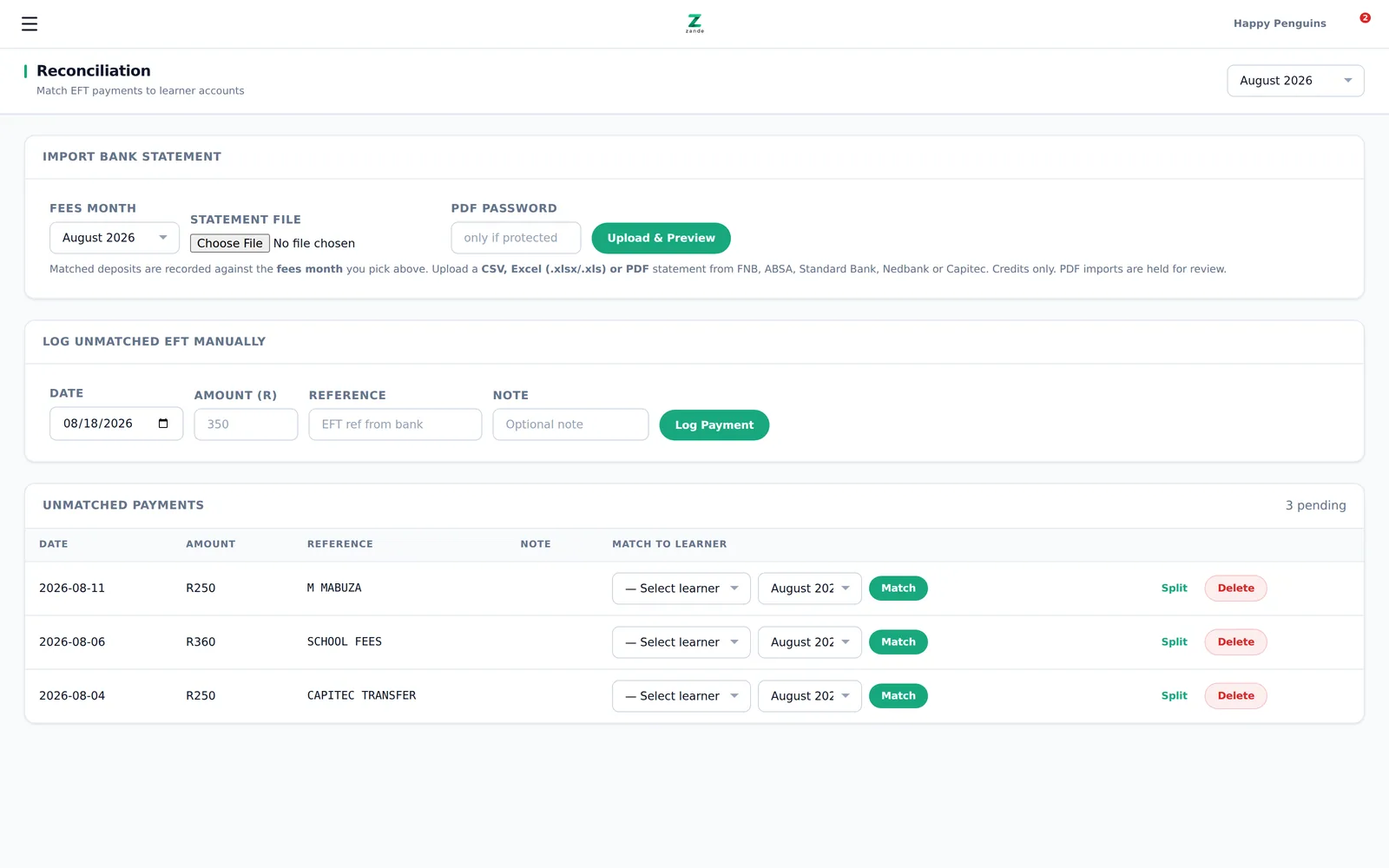
This is the real screen, not a mockup. Three deposits off a South African bank statement. Two of the three references identify nobody.
Two of those three references identify nobody
Look at the screen above. Three deposits. R250 with the reference M MABUZA. R360 with the reference SCHOOL FEES. R250 with the reference CAPITEC TRANSFER.
Two of those three identify nobody. M MABUZA is somebody's aunt paying for a child with a different surname. SCHOOL FEES tells you what it is for and not who it is for. CAPITEC TRANSFER is what the bank wrote, not what the parent wrote.
So on the 7th you sit with the statement open on your phone and the fee book on the table and you work backwards. You know the Grade R fee is R360 and only a handful of children pay R360. You phone one mother to ask if that deposit was hers. Two hours later there is still one you cannot place, so you leave it. Next month there are three more.
Then the wrong thing happens. You send an arrears reminder to a parent who paid on the 5th, because her deposit is still sitting in the pile you never got to. She is upset. You are embarrassed. So you go softer on reminders after that, and a R4,000 gap becomes a R12,000 gap.
Software written for centres in the United States tends not to have a screen for this, because centres there generally collect by card or bank debit and the payment carries the account it belongs to. An unreferenced deposit is not the same everyday problem it is here.
How it works
Upload the statement straight from your banking app
Open your banking app, download the statement PDF, upload it to Zande. FNB, ABSA, Standard Bank, Nedbank and Capitec are read directly. CSV and Excel work too if that is what your bank gives you. No bank login is handed over and no accountant is needed.
Zande matches what it can
It reads every deposit line and matches on the reference, the amount, the payer name and what that family has paid before. Clean references match on the first pass. A parent who has sent R250 from the same account for six months gets matched even when the reference is blank.
You clear the unmatched queue
Anything Zande cannot place with confidence goes into an unmatched queue instead of being guessed at or dropped. Open the queue, tap a deposit, pick the learner. Each one takes seconds. The queue is the job now, not the whole statement.
It learns and the queue shrinks
Every correction is remembered. Assign M MABUZA to Thandi once and the next M MABUZA deposit is matched for you. The queue is longest in month one and short by month three, because the odd references at your centre are the same odd references every month.
What you get
PDF statements from five banks
Upload the PDF exactly as your banking app downloads it, from FNB, ABSA, Standard Bank, Nedbank or Capitec. CSV and Excel are accepted as well.
An unmatched queue, not a guess
Deposits Zande cannot place with confidence sit in a queue you clear. Nothing is silently attached to the wrong child and nothing disappears.
It learns your parents
Correct a match once and Zande remembers the payer name, the account and the amount pattern. The aunt, the boyfriend and the employer all get recognised next month.
Split one deposit across siblings
A parent sends R610 for two children in different classes. Split that deposit across both learners in one action and each statement shows the right amount.
Cash and SASSA captured the same way
Cash at the gate and grant payments are recorded against the learner alongside EFT deposits, so one arrears list covers every payment method.
Arrears that are actually true
Once deposits are matched the arrears list is real. WhatsApp reminders go out on the 26th, 6th and 20th and never to a parent who already paid.
Why trust this one
Zande is built by Siyabonga Ndlovu, who runs a 114-learner crèche in Hazyview, Mpumalanga. The reconciliation screen exists because he sat with the same unidentifiable deposits on his own statement and got tired of it. Every rule in the matcher came from a real deposit that did not match.
The screen at the top of this page is the actual product, not a mockup. Those are real reference formats off a South African bank statement.
Setup is free and done for you. Send a spreadsheet or a photo of the register book on WhatsApp and Zande loads it. One 300-child centre was loaded from a single fee spreadsheet, including eight months of payment history, so the matching had that history to learn from on day one.
Money never touches Zande. Parents keep paying into your own Capitec, FNB, Standard Bank, ABSA or Nedbank account by EFT, cash or grant. Zande takes no cut of tuition.
What it costs
Starter is R99 a month for up to 40 learners, which works out to R2.48 per learner. Pro is R299 a month for up to 100 learners, R2.99 per learner. Growth is R499 a month for unlimited learners, R3.33 per learner at 150 children. Setup is free, there is no card to start, and you pay only when you go live. One R360 fee recovered because the deposit was finally matched covers most of a month on Starter.
Common questions
Do I have to give Zande my bank login?
No. You download the statement PDF from your banking app the way you already do and upload the file. Zande never connects to your bank account and never moves money. Parents keep paying into your own account.
What happens to a deposit that matches nobody at all?
It sits in the unmatched queue showing the date, amount and reference until you assign it. It is never guessed onto a learner and never quietly written off. Leave it a week and come back to it.
A parent pays one amount for three children. Does that work?
Yes. Open the deposit and split it across the siblings. Each child's statement gets the right portion, and the split is remembered for that payer next month.
How long before it stops needing me?
It never stops completely, because there is always a new parent or a new payer. The realistic pattern is a long queue in month one, much shorter in month two, and a handful by month three once the regular payers are learned.
My statement is a scan, not a proper PDF. Then what?
Send it on WhatsApp to 066 238 2296 and it gets sorted out with you. If your bank can export CSV or Excel, that is the cleanest option and Zande reads it directly.
Set up your whole centre free and see it running with your real class list before you pay anything. Send us a spreadsheet or a photo of the register book on WhatsApp and we load it for you.
Set up your centre free →